Blog
The Apps & Tools Pyramid: What's Worth Paying For
A seven-tier map of the apps and tools worth paying for, from frontier AI at the top to the cheap, boring essentials at the bottom.
The Apps & Tools Pyramid: What's Worth Paying For
Most "best apps" lists are flat. Forty tools, no order, no opinion about what matters first. This pyramid is the opposite: seven tiers, ranked by where your money works hardest. Read it as an opinion to react to, not a receipt - more on that at the end.
Here is how each tier earns its place.
Frontier AI
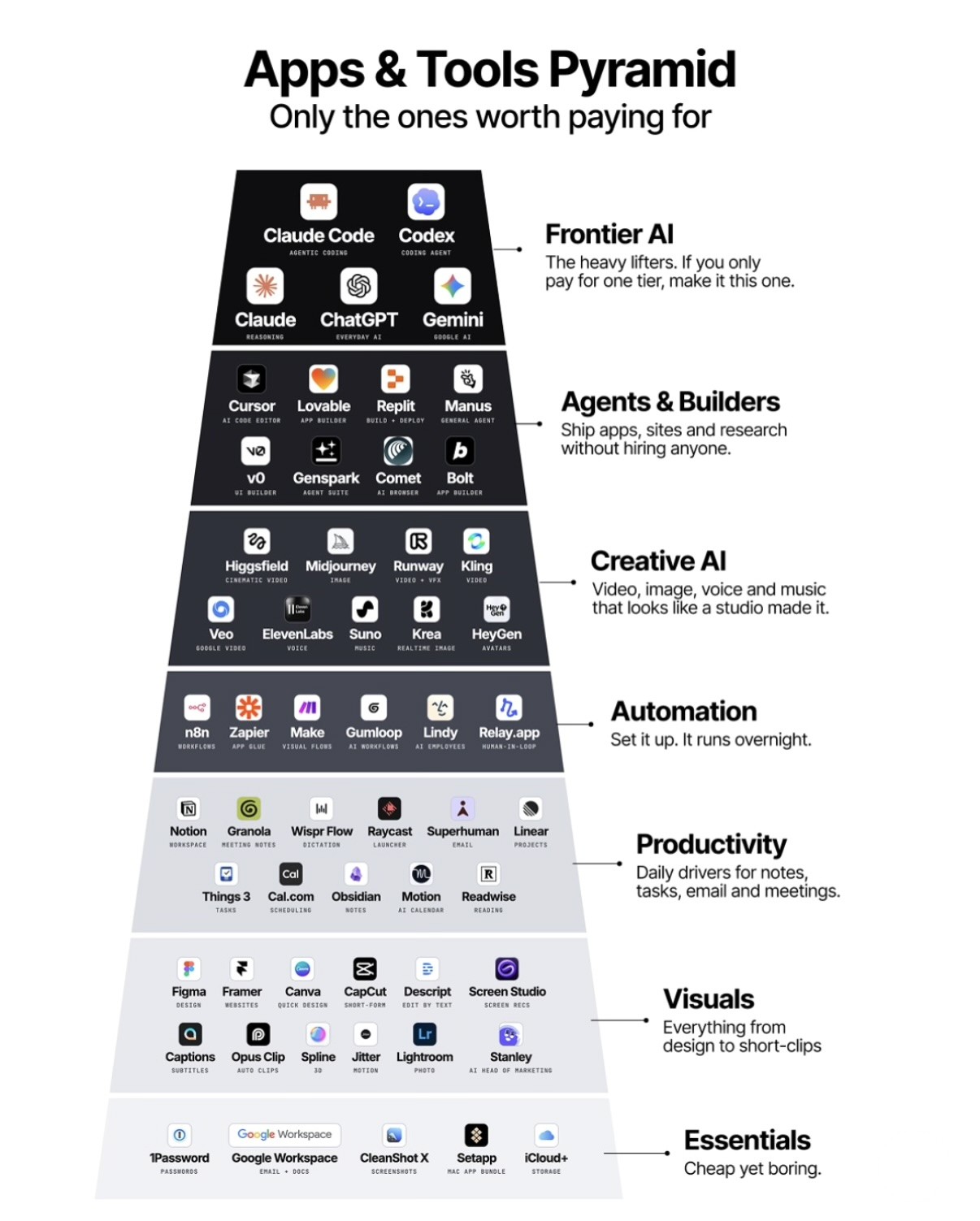
The heavy lifters: Claude Code and Codex for agentic coding, Claude for reasoning, ChatGPT as the everyday default, Gemini for the Google side. The graphic's advice, and the reason this tier sits on top: if you only pay for one tier, make it this one. This is the tier that does actual work, not the tier that organizes it.
Agents & Builders
Cursor, Lovable, Replit, Manus, v0, Genspark, Comet and Bolt. The tier's pitch is shipping apps, sites and research without hiring anyone. Treat that as a strong claim to test on something small before you build a business on it: one finished project tells you more than five half-built ones.
Creative AI
Video, image, voice and music: Higgsfield, Midjourney, Runway, Kling, Veo, ElevenLabs, Suno, Krea and HeyGen. The pitch is output that looks like a studio made it. Close enough, often enough, that the tier earned its spot.
Automation
n8n, Zapier, Make, Gumloop, Lindy and Relay.app. "Set it up, it runs overnight" is the tier's promise. The honest version: it runs overnight once the workflow is stable, and getting there is where the time goes.
Productivity
The daily drivers for notes, tasks, email and meetings: Notion, Granola, Wispr Flow, Raycast, Superhuman, Linear, Things 3, Cal.com, Obsidian, Motion and Readwise. Useful every day - which is exactly why this tier is the easiest place to collect subscriptions you stopped opening.
Visuals
Everything from design to short clips: Figma, Framer, Canva, CapCut, Descript, Screen Studio, Captions, Opus Clip, Spline, Jitter, Lightroom and Stanley. The sensible move is paying for the one that matches the kind of output you actually ship.
Essentials
Cheap yet boring: 1Password, Google Workspace, CleanShot X, Setapp and iCloud+. Nobody brags about these. Everyone notices the day they lapse.
How to read the pyramid
Top down. Fund the tier that does the work before the tier that organizes the work. If a lower tier is crowded and the top one is thin, the stack is upside down.
And the caveat that matters: this is a map, not a receipt. These are the graphic's picks, offered as a starting opinion - not a claim that I personally run or pay for all of these tools. Nobody needs all of it. The pyramid is a way to decide what earns a subscription this month, and what gets cancelled.